


日本語A&M GROUP Official SiteProfessional AI Multi-AgentSound Engine DOMEarEffect

Product — Application

EarEffect

It reads the song being played and selects the sound for that song. You do not need to remember any settings.

Downloads
140,000
Presets
840 presets
Platform
Chrome on Android and PCs

Overview

About EarEffect

An app that delivers the sound of Sound Engine DOM to general users. It runs as an app on smartphones (Android) and as a Chrome extension on PCs. EarEffect does not play music. It refines the sound that other apps are playing, at the device's output stage. It works regardless of which app is playing, and with the earphones or speakers you are already using. 140,000 downloads worldwide in total.

Where it runs
Smartphone (Android) apps and Chrome extensions for computers
What is read
Title, artist name, and album name of the song being played
What it applies to
DOM presets prepared for each genre
What you do not need
Knowledge of settings, and replacing earphones or speakers
What Is EarEffect
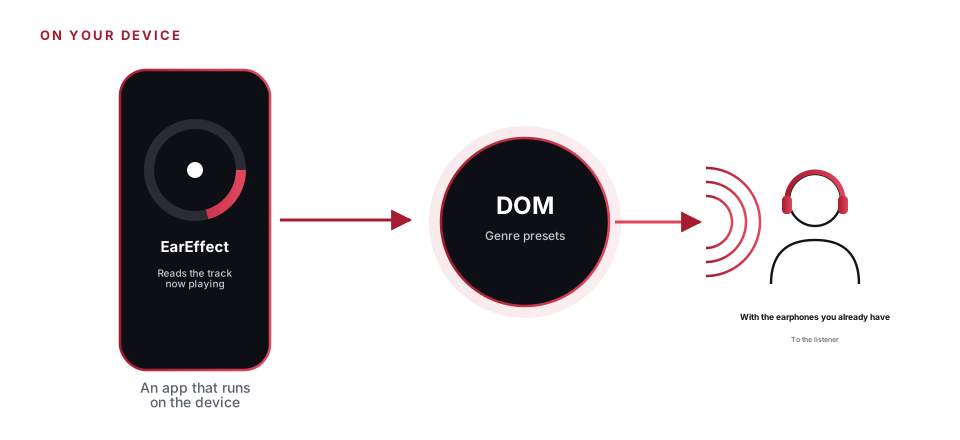
It reads the song being played, determines the genre, applies a DOM preset, and delivers the result through the earphones you already use.

How it works

Reselecting the sound every time the song changes

  1. Read the song

    The song title, artist name, and album name are received from the notification of the app that is playing the music (notification access permission is required).

  2. Set the genre

    The app queries 3 music databases and, using weighting rather than a majority vote, decides on one of 21 genres. Confirmation generally takes a few seconds. If the result does not reach the threshold, Pops is selected.

  3. Applying sound

    A preset that matches the genre is applied to the device's output. When the track changes, the process starts over from the genre detection.

  4. Remembers your re-selections

    If an assessment is wrong, you can reselect by hand. Reselections are remembered per artist and applied from the next time onward. Even for an artist heard for the first time, the selection is based on how selections were made until then.

Everyday

You can keep using your own earphones, even on the move

Each time the song changes, EarEffect identifies the genre and selects the sound again. There are no settings to remember.

Presets

Presets prepared for each genre

840 presets

Total number of presets

21 genres × 40

21 genres

Genre

Rock, jazz, classical, and more. Includes 7 types for cinema and 3 types for games

40

Presets by genre

Beneath each name, words describing the character of the sound are listed. There are no restrictions by model.

Control

Finish with BOOM and ATTITUDE

  1. BOOM

    Sets the amount of low-frequency content. The higher you raise it, the more the affected band itself shifts, to 40 Hz to 150 Hz.

  2. ATTITUDE

    Changes the character of the sound within a range of −100 to +100. Shelving across 5 bands is compensated so that the volume does not change.

  3. ON

    This turns the effect itself on and off. You can compare it with the original sound at any time. While checking how strongly the effect is applied, you can finish the sound to your own taste.

  4. Touch

    The device responds with vibration at each step of the control. You can tell the knob position without looking at the screen.

Plan

Free plan and Premium

Free plan
  • You can choose and use any of the 21 modes yourself
  • There is no expiration date for use
  • No ads are displayed
Premium
  • All 840 presets
  • Automatic detection matched to each song
  • Display of song information and artwork
  • Learning from re-selections
Fees
  • ¥390 per month ($1.99)
  • ¥2,340 per year
  • Prices vary by country and exchange rate
Payment and cancellation
Billing is handled through Google Play. To cancel, use "Subscriptions" in the Google Play Store; you can keep using the service for the period you have already paid for after cancelling.
Computer
The same Premium is also available in the Chrome extension at no additional charge.

Computer

On a computer, as a Chrome extension

  1. How to introduce

    Add the "EarEffect" extension to Chrome on your computer. On a tab that is playing sound, click the icon to use it.

  2. Sound that is refined

    The target is the sound played in the browser tab. Voices in web meetings, as well as videos and music, are adjusted using the same approach as on the smartphone version.

  3. One plan

    If you sign in with the same Google account in the app settings and the extension, a Premium subscription purchased on either your smartphone or your computer can be used on both.

Engine

Sound design

Sound Engine
Sound Engine DOM
Patent
Patent No. 7251007 (Japan, United States, Germany, United Kingdom)
Track record in broadcasting
In the broadcasting field, delivered audio processing software after on-site verification
Presets
Each one is created in the mastering process by the same designer who designed DOM.
Where processing takes place
Applies to the Android output itself, regardless of which playback app you use.

Support

Support

Contact
support@ear-effect.com
Provision
A&M GROUP INC.
Location
8-15-6 Isobe, Mihama-ku, Chiba City, Chiba 261-0012, Japan
Terms and personal information
The terms of use are set out in the "EarEffect Terms of Use," and the information we collect is set out in the "EarEffect Privacy Policy."

Case study

Case Study

We present the flow and the finished form in the form of reports. Each one states clearly whether it is based on our actual operations or is an example assumed from how such work is normally done.

With your usual earphones, the sound changes from song to song.
Example based on typical ways of working

During the commute

With your usual earphones,
how each song sounds changes.

People who listen to music while commuting want better sound without replacing their earphones.

  1. Install the app and play your usual tracks
  2. The app reads the track and selects the sound
  3. Finish to match your preferences
  4. Compare by ear with the unprocessed sound

ReportReport for this case

Flow
Playback → reading → selection → finishing, all completed at hand.
Deliverables
  • Sound selected for each song
  • Finish to your taste
  • A/B listening comparison
Points to confirm
  • Whether it can be used without learning the settings
  • Does the sound change from song to song?
  • Can you compare with the raw sound right away?

Make the music you listen to while working easier to hear in Chrome on your computer.
Example based on typical ways of working

While working at home

Make the music you listen to while working
easier to hear in Chrome on your computer.

A person who plays music from a computer while working at home wants a sound that does not cause listening fatigue, even with the headphones they already own.

  1. Install it in Chrome and play your usual tracks
  2. The sound that suits the song is selected
  3. Finish to your taste
  4. Compare by ear with the unprocessed sound

ReportReport for this case

Flow
Playback → selection → finishing → comparative listening, all completed on a computer.
Deliverables
  • Sound selection that runs in Chrome
  • Finish to your taste
  • A/B listening comparison
Points to confirm
  • Does the interface stay out of the way of the work?
  • Does the sound change from song to song?
  • Can you compare with the raw sound right away?

Run on devices around the world, and keep updating.
Example based on our own operating experience

Users around the world

Running on devices worldwide,
and continuing to update.

Here is an example from our own operations. EarEffect has accumulated 140,000 downloads worldwide, and we keep updating it to keep pace with device and operating system updates.

  1. Keep watch on device and operating system updates
  2. Pick up defects from user feedback
  3. Build updates and verify them
  4. Publish and check the response

ReportReport for this case

Flow
We continue the cycle of monitoring → identifying → updating → publishing.
Deliverables
  • Update plan and records
  • Records of checks for each device
  • Updates to terms and policies
Points to confirm
  • Does it still work after an update?
  • Whether user feedback is being addressed
  • Whether it complies with the store's rules

Contact

Inquiries about partnerships and integration

We welcome inquiries about partnerships from device manufacturers and service providers.

Inquiries About EarEffect