日本語A&M GROUP Official SiteProfessional AI Multi-AgentSound Engine DOMEarEffect

Product — Sound Engine

Disruptive innovation in sound

Play 1,000 yen earphones with the sound of 50,000 yen equipment. This next-generation Perception AI controls sound quality: it rebuilds the audio signal in software just before it reaches the device, changing the tone as much as replacing the hardware would. You manage sound quality in software without replacing equipment. It can be built into firmware or used simply by installing it as software.

Patent
No. 7251007
Territory
Japan, the United States, Germany and the United Kingdom
Stage
Delivery and installation testing

Why DOM

With a ¥1,000 pair of earphones, it reproduces sound equivalent to that of a ¥50,000 device

Beyond hardware

Improve sound quality with software, without replacing your equipment

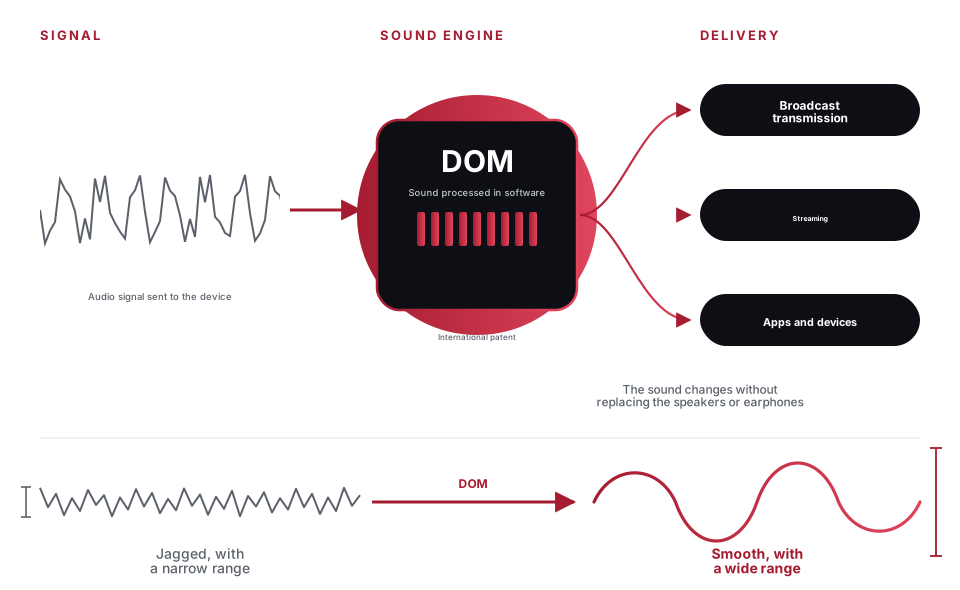
Until now, sound quality has been determined by the components and price of speakers and earphones. DOM rebuilds the audio signal just before it reaches the device, making a 1,000 yen pair of earphones sound like a 50,000 yen device. It raises the sound of the devices you already have, without replacing them.

Firmware

Can be built into firmware

It can be built into the firmware of earphones, speakers, car audio, TVs, and other devices. Without changing any parts or the housing, you can change the sound of the product you ship.

Install

Just install the software

It works on computers, smartphones and streaming systems simply by being installed as software. No dedicated equipment or specialist acoustic knowledge is required.

Concept

A mechanism that keeps sound quality intact even when strong processing is layered

The more strongly sound is processed, the more digital processing shaves off the tops of waveforms and thins out the sound. Applied strongly, it normally causes the sound to break down. It is also known in audio production that stacking plugins in many stages makes the sound harsh and removes depth. For DOM, we have newly developed a mechanism in which the sound does not break down even when processing is applied at the same intensity, or stacked in many stages. This makes it possible to apply strong effects.

Even at an intensity where ordinary digital processing would distort the sound, DOM does not distort it.

When effects of the same strength are stacked the same number of times (the dashed line is the ceiling)

Conventional digital processing

It hits the ceiling, the peaks are crushed, and the difference between loud and soft is lost

DOM

It rises without touching the ceiling, keeping the difference between loud and soft

Applying processing repeatedly

The thickness of the sound is preserved

Even when applied strongly, the thickness and depth of the sound remain. While the volume is lowered, the dynamic range actually widens (17 of 20 cases).

No audio distortion occurs

Changes the sound without raising the volume. Presets that exceeded the true peak of the source material: 0 cases.

Sound does not degrade even when processing is applied repeatedly

No matter how strongly it is applied or how many stages are stacked, the shape does not break down. With the same input and the same settings, the output matches in every digit across all 20 cases.

The diagram above is a conceptual illustration of how the mechanism works. The measured results are in the "Measurement results" section of this page.

Overview

About Sound Engine DOM

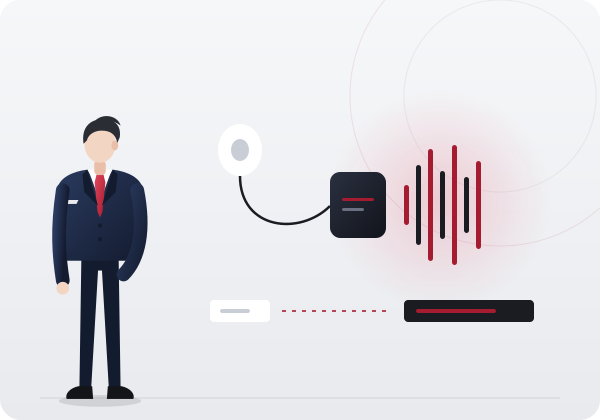
The sound of speakers, earphones, in-car audio, and communications equipment has until now been determined by the performance of the device itself, and the only way to improve it was to replace the device. DOM processes the audio signal in software just before it is sent to the device, and uses presets created for each device to adjust the body, clarity, and imaging of the sound. Because the processing is completed within software, it can be built into any mechanism that plays sound, such as broadcast playout systems, streaming service players, apps, and the embedded OS of home appliances and in-car devices. Presets can be added or replaced through software updates, so the sound can be changed while keeping the same device.

Where processing takes place
The audio signal just before it is sent to the device
What changes
Sound thickness, clarity, and imaging. Presets for each device and situation
What stays the same
Speakers, earphones, and the devices themselves
Type
International patents (Japan, United States, Germany, United Kingdom)

What is Sound Engine DOM
Processes the signal just before it is sent to the device while switching presets, and delivers it to broadcast, streaming and apps.

How it works

The mechanism that processes signals

  1. Create a preset

    Our engineers create the processing settings for each playback device and use case (voice guidance, music, calls, and so on).

  2. Save a preset

    Saves the settings you have made as presets. You can keep several for each device and situation. Saved presets can be used to reproduce the same sound on another device or in another situation.

  3. Load a preset

    At playback, a preset suited to the device and the situation is loaded and the audio signal is processed. Without changing devices, simply switching presets changes how the sound is heard.

  4. Send to the device

    The processed signal is sent as it is to speakers, earphones, and communication equipment. No modification of the equipment is required.

PoC

Plugin used in a PoC in the broadcast field

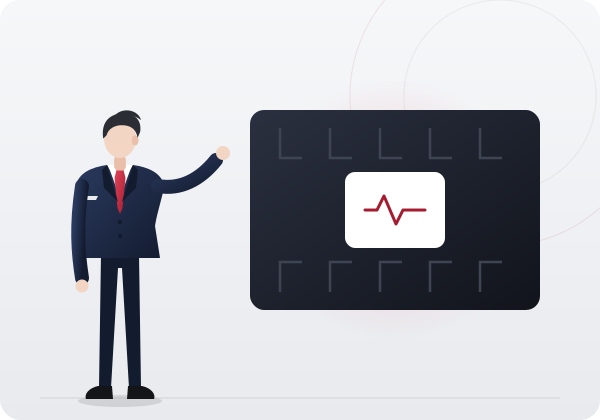
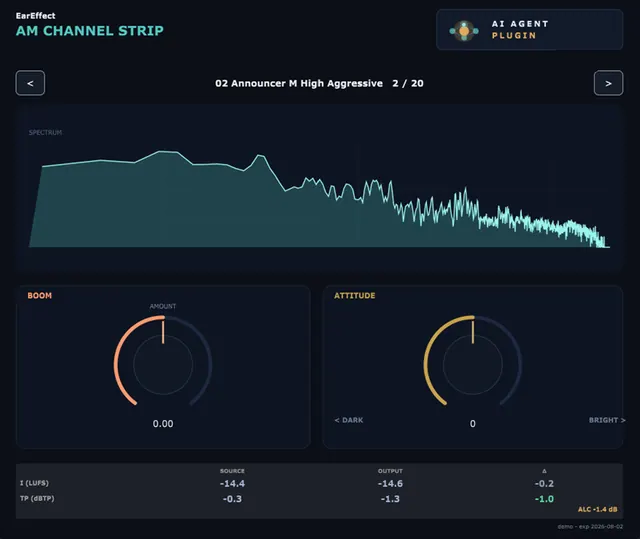
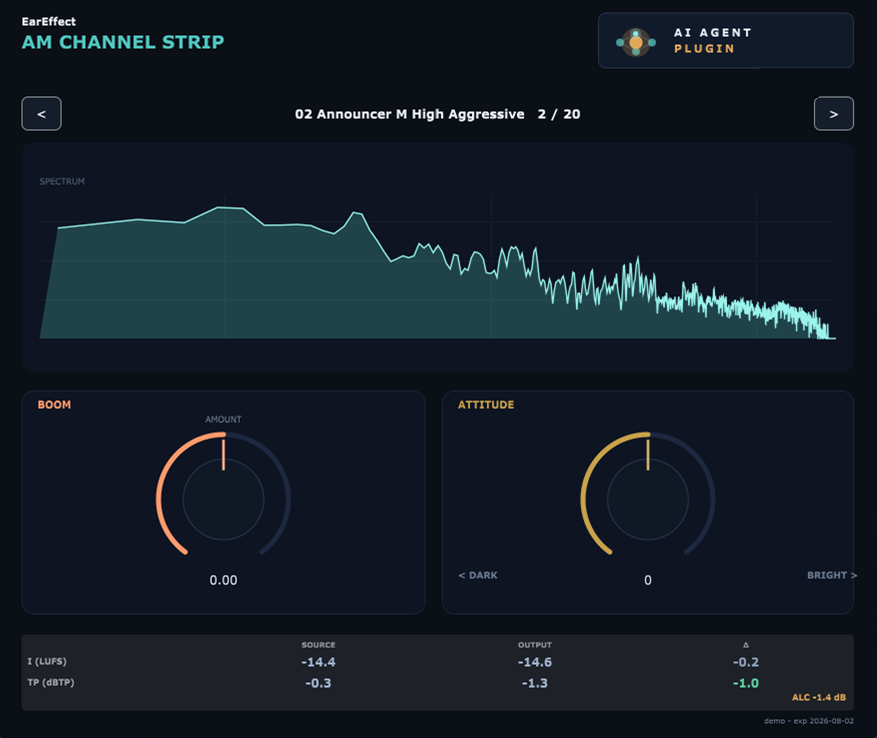
This is the actual screen of a plugin with DOM built in. It is installed as a VST3 plugin in software used for editing and playing out audio, and it processes the audio signal by switching among 20 presets prepared for each voice type and processing strength.

Presets
Prepared for each voice type and processing strength; switch between them with the left and right arrows. The example on screen is Announcer M High Aggressive.
Adjustment
Adjust how the processing takes effect with the BOOM (AMOUNT) and ATTITUDE (DARK to BRIGHT) knobs
Spectrum
Displays the frequency distribution of the sound being processed, in real time
Measurement
Displays the loudness (LUFS) and maximum peak (dBTP) before and after processing, along with the difference between them. It also shows the amount of automatic level control (ALC) applied.
Plugin screen with Sound Engine DOM built in
Screen of the plugin used in a PoC in the broadcast field. Some displays are hidden.

Track record

Track record

  1. Delivered in the broadcast field

    Delivered audio processing software after listening tests and verification at broadcast sites.

  2. Trial deployment decided in the broadcast and streaming field

    In the broadcast and streaming field, a new introduction test has been decided following a demonstration.

  3. Our own app EarEffect

    An app that delivers the sound of DOM to general users. Released for Windows and Android Auto, with multilingual screens. 140,000 downloads worldwide to date.

  4. International joint development

    Co-developed with members in the United States, United Kingdom, Germany and Sweden (since 2020). Broadcast effect features have been in development since 2020.

Figures

DOM in Figures

No. 7251007

International patents

Japan, the United States, Germany and the United Kingdom

140,000

EarEffect global cumulative downloads

Our own app with DOM built in

4 countries

International joint development

Members in the United States, the United Kingdom, Germany, and Sweden

Evidence

Measurement results

We ran 20 presets through the same material and measured them in units defined by international standards. The pass/fail criteria were set before measuring. What we have not measured, we state as not measured.

0 cases

Presets that exceeded the true peak of the source material

If even one is exceeded, it cannot be said that the sound was changed without raising the volume

17 of 20

Presets with a widened dynamic range

The remainder was deliberately built without widening it. Volume became lower in all 20 presets

All 20

With the same input and the same settings, the output matches across every digit

Updating the engine does not make the sound move

Differences in sound by setting

How much the sound from the same equipment changes just by selecting a setting. This is the spread for each frequency band.

The lowest band's 34.0 dB comes from a single setting that cuts the low range. Excluding that one setting, it is 10.7 dB. The mid and high ranges are close under every setting, so the sound is changed without disrupting how dialogue is heard.

Most frequently opened width / median

Lowest range (20–100Hz)Where the thickness of the foundation changes most

34.0 dB11.3 dB

Low-mid range (100Hz–1kHz)Adjusts the amount of muddiness

4.5 dB3.1 dB

Upper-mid range (1k–8kHz)The dialogue band. Results are close regardless of setting

3.8 dB2.0 dB

High range (8k–19kHz)Gloss and airiness change

7.3 dB7.0 dB

Volume and dynamic range

Processing that raises volume narrows the range between loud and soft because it shaves off peaks. The measured results were the opposite. Volume went down and the range between loud and soft widened. Where it was not widened, that was deliberately designed.

It widens the dynamic range while lowering the volume. This is what it means for the sound to "open up."

Presets with a widened dynamic rangeThe rest were deliberately made without widening it

17 of 20

Spread (median)

+0.21 dB

Spread (maximum)

+1.04 dB

Change in volume (median) All 20 presets became quieter

−3.78 LU

Peak overshoot relative to the source material None exceeds −0.446 dBTP

0 cases

Change in perceived sound

We compared the sound before and after processing in the band divisions the ear uses to hear sound separately. Measured using ISO 532-1 specific loudness.

Total loudness goes from 86.6 sone to 82.6 sone (−4.6%). While the whole is made smaller, the dialogue band is reduced by a smaller amount. Sound pressure is calibrated with 0 dBFS as a sound pressure level of 105 decibels.

Rate of change / perceived composition ratio

Before processingAfter processing

Low-frequency foundation

−0.7%From 10.8% to 11.2% (+0.4 points)

Muffled band

−7.5%From 27.1% to 26.1% (−1.0 points)

Dialogue bandThe band that affects how dialogue is heard

−2.8%From 48.8% to 49.7% (+1.0 points)

Highest range

−8.3%From 13.1% to 12.7% (−0.4 points)

True Peak

We confirmed for each preset that the ceiling is not exceeded.

Measurement follows ITU-R BS.1770-4 Annex 2 (4x oversampling).

True peak of the original material

−0.446 dBTP

Highest output

−0.65 dBTP

Lowest output

−0.97 dBTP

Difference from the source material

−0.20 dB to −0.52 dB

Presets that exceeded the source material

0 cases

Reproducibility

The same input was passed through the engine as delivered in the product, and the output byte sequence was compared, across every digit, with the output stored as the reference.

Matching passes an input of 30 seconds, 44.1 kHz, stereo, float32 through the process and compares the SHA-256 of the output. This standard applies to 44.1 kHz, 2 ch.

Presets match in every digitIf even one differs, reproducibility cannot be claimed

All 20

Mismatch

0 cases

Characteristics once built in

These are measurements from use in which it is added as just one stage in the signal flow of existing equipment.

If DOM is removed, the signal flow returns to the same state as before it was built in.

Processing latency

Fixed at 143 samples (equivalent to 2.98 ms at 48kHz)

CPU add-on

+1.1%

Changes to existing equipment

None

What we have not measured

  • Operation at 48kHz, multi-channelTo verify under this condition, the processing coefficients must be recalculated and the reference values used for matching must be recreated.
  • Whether people can hear the differenceA double-blind test at the same location with the same source material is yet to be carried out.
  • Whether dialogue becomes easier to understandOnly if the difference can be heard will we score it, still under blind conditions.

Measured on October 30, 2026. 20 presets. The measurements were made by our company, not by a third party.

Patent

Patent

Patent number
No. 7251007
Name
Method, electronic device and program for processing an acoustic signal supplied to a device
Country of registration
Japan, the United States, Germany and the United Kingdom
Details
A method that adds our algorithms and formulas to the processing for creating, saving, and loading presets
Originator
Hirotoshi Sakamoto (Representative Director, President, CEO and CTO, A&M HOLDINGS INC.)
Implementation
C++、JUCE

Sound

Change your sound quality without replacing your equipment

DOM processes the audio signal in software just before it is sent to a device. It can be built in wherever sound is played: broadcasting, streaming, games, home appliances, cars and calls.

Industries

Embedding targets

DOM is software that processes the audio signal just before it is sent to a device. It can be built into a playback player, an app, a device's embedded OS, communication software or a DSP. Processing settings are held as presets and switched for each device and situation. Because new presets are delivered through software updates, the sound can be changed without replacing the device. The field at the deployment stage is broadcasting and streaming, where there have been deliveries and a decision to conduct new deployment tests. The areas below are forms of integration that we propose.

AI Voice and Speech Synthesis

The output of speech synthesis is passed through DOM to adjust the thickness of the voice and the clarity of pronunciation. For speech recognition, we envision placing it at the input stage, preparing the audio so that it is easier to recognize before handing it over.

  • Where it is embedded: the output section of speech synthesis engines and the input section of speech recognition
  • Uses: reading out announcements, character voices, and speech synthesis based on voice actors' voices
  • Comparison audio: synthesized female and male voices

Gaming

Built into the audio output section of game consoles, PC games, and game apps. We create presets for each title and device, such as making footsteps easier to hear, separating ambient sound from voice chat, or boosting bass.

  • Where it is embedded: the audio output section of games and game apps
  • Examples of adjustment: opponents' footsteps, team conversation, ambient sound
  • Comparison audio: game ambient sound, battle scenes

Music, video, and live streaming

We build it into the playback player of a streaming service or the delivery side of live viewing, so that users receive processed sound whichever earphones they listen with. Presets are prepared for each type of playback device.

  • Where it is embedded: playback players and streaming delivery systems
  • Audio processing software delivered in the broadcast field
  • Comparison audio: orchestra, rock, jazz, EDM

Film and video

Built into audio output for film and live viewing screenings, playback players for video streaming, and in-flight entertainment movies on aircraft. Presets for each title and screening environment balance dialogue clarity with the impact of sound effects and music.

  • Where it is embedded: screening audio systems, video streaming players, and in-flight media systems
  • Add presets through a software update, without replacing the speakers or seat-mounted equipment

Aircraft

Built into the audio output of seat media systems, it tunes the sound of music, radio, and movies while passengers keep using the earphones and headphones distributed on board. The same engine can also be used for the cockpit radio audio output and for call apps for ground staff.

  • Where it is embedded: seat media systems, wireless audio output, and calling apps used by ground staff
  • Presets are added through software updates, without replacing the onboard equipment

Space

Built into apps that work with the communication software of ground stations, space stations, and rockets, it adjusts call audio so that it is easy to hear even amid noise such as engine sound. Because software handles the audio processing, communication equipment can be chosen on the basis of strength and reliability.

  • Where it is embedded: communication software and apps on astronauts' handheld devices
  • Implementation: C++, JUCE

Transportation infrastructure

We build this into the playback systems for in-vehicle announcements on trains and buses, and for voice guidance around stations, bus stops and ticket machines. Presets are switched to suit conditions such as above-ground and tunnel sections, the level of crowding, and how sound is absorbed by heavy winter clothing.

  • Where it is embedded: playback equipment for in-vehicle announcements and station announcements
  • Target audio: AI speech synthesis, pre-recorded audio files

Automotive

We build it into the car audio system and prepare presets optimized for each car model and factory-installed speakers. The sound changes without replacing the speakers, and new presets are delivered through software updates.

  • Where it is embedded: car audio and infotainment systems
  • Our own app EarEffect supports Android Auto

TVs and home appliances

Built directly into the embedded OS of TVs and audio equipment, it processes all the sound the device outputs, including terrestrial broadcast programs, internet streaming, and voice guidance. New presets are delivered through online updates.

  • Where it is embedded: the built-in OS of home appliances and playback players
  • Target devices: TVs, audio equipment, smart speakers

Healthcare

We envision embedded uses such as adjusting hearing for each user of hearing aids and cochlear implants through software presets, making heart sounds easier to hear on electronic stethoscopes, and tuning intercom audio during surgery to suit the medical procedure. It improves intelligibility through sound quality, not volume.

  • Target devices: hearing aids, cochlear implants, electronic stethoscopes, operating room intercoms

Call Center

We develop custom calling software with DOM built in, so you can keep your existing business headsets. We prepare several sound-quality presets so that each operator can choose the sound that suits them.

  • How we provide it: custom development of call software for call centers
  • No need to replace the headset

Telecom carriers

Built into a carrier's official app, calling service or device, it refines the sound coming from subscribers' devices and the voice audio of calls. Presets are prepared for each device model.

  • Where it is embedded: carriers' standard apps, calling services, and built-in software on devices

Calls and online meetings

We build it into internet calling, calling apps, and online meeting software, and make the voice easy to understand even when bandwidth is limited and audio is heavily compressed.

  • Where it is embedded: calling apps and online meeting software
  • Target: general calling apps and calling services on smartphones for seniors

Software

Software formats that DOM can be built into

DOM processing can be built into apps, preinstalled apps, software, DSPs or plugins.

Software

Software development using DOM

  1. App development

    We build DOM into iOS and Android apps. This can mean adding only the audio processing to an existing app, or creating the whole app, including its functions and screen design. We envision in-house calling and meeting apps, resident apps that process the sound of other apps, and noise-reduction apps.

  2. Preinstalled app development

    We develop apps that come preinstalled on devices for telecom carriers. Because a preinstalled app can work at layers that third-party apps cannot reach, such as the output stage of call audio, it can offer a function for choosing the sound of calls from multiple presets. We also design processing tailored to output devices connected via Bluetooth.

  3. Software development

    Built on JUCE, we write functions for which no existing components are available from scratch in C++. DOM itself is software developed this way. We also port it to suit the target environment, such as Linux and Web Audio.

  4. DSP development

    For DSPs (digital signal processors), we develop both audio processing that runs in software and the software that is loaded onto the chip. Targets include earphones, headphones, smart speakers, hearing aids, robot speakers and station announcements.

  5. Plugin development

    We develop audio processing plugins for music production and various industries, including effects, software synthesizers, and mechanisms that identify sounds with AI. We take on projects from one-off studio work to products intended for commercial release, including license management mechanisms.

Technology

Technologies we support

Development language
C++、JUCE
Plugin standards
  • VST
  • AU
  • AAX
OS
  • Windows
  • Mac
  • Linux
  • Android
  • iOS
Other Environments
  • Web Audio
  • Systems running on a proprietary OS (connection parts developed individually)
The connection point for audio processing
Developing from scratch the connection layer (bridge) that calls processing written in C++ and JUCE from apps in each language and on each OS

DOM Cloud

DOM Cloud (just upload a file)

  1. What is DOM Cloud?

    Building DOM into a device or app requires development. DOM Cloud is a service for using DOM processing without that development. We build presets in the cloud to suit the customer's use case, and the customer uploads audio files and receives the processed files. As long as the same preset is used, the same processing is applied no matter how many times files are uploaded, so the finish does not vary from file to file.

  2. No specialist knowledge required

    The only operation is uploading a file. No development knowledge such as C++ and no acoustics specialist is required.

  3. The same process can be repeated

    Once a preset is created, it is reproduced as is in the cloud, so the finish is consistent from file to file.

  4. Presets can be expanded

    Presets can be added in the cloud, and a new preset can be created for each project. New use cases can be handled without a software update.

  5. Customer-only page

    Pages are separated for each client and are not listed on search engines. Listening audio sources and presets are handled only within the client's scope.

  6. AI-based parameter tuning (optional)

    An option lets AI adjust the processing settings, so even staff with no knowledge of audio can operate it.

Listen

Hear the difference for yourself.

You can compare the same audio source with DOM on and off, right on this page. You can hear the difference with the earphones you normally use.

How to listen

How to compare by listening

In each video, the same audio source is played without DOM and then with DOM. For speech synthesis, listen for the fullness of the voice and the clarity of pronunciation; for music, the separation of each instrument and how the bass and treble come through; for games, how ambient sound and dialogue are distinguished. No expensive equipment is needed. You can hear the difference with the earphones you normally use.

Listen

Comparison audio (DOM on and off)

AI Speech Synthesis: Female Voice (A)A female voice created with AI speech synthesis. Listen and compare how the richness of the voice and the clarity of pronunciation change with DOM on and off. Target fields: AI, transportation, aviation, automotive
AI Speech Synthesis: Female Voice (B)The same comparison using a different female voice. You can check how intelligibility changes even when the voice quality differs. Target fields: AI, transportation, aviation, automotive
AI Speech Synthesis: Male Voice (A)A male voice created with AI speech synthesis. Listen and compare the firmness, the depth, and the definition of the words. Target fields: AI, transportation, aviation, automotive
AI Speech Synthesis: Male Voice (B)The same comparison using a different male voice. You can hear the change in the muffled quality that tends to occur with lower voices. Target fields: AI, transportation, aviation, automotive
Music: Orchestra (A)An orchestral piece. Listen and compare whether fine details are preserved when the impact is increased. Target fields: games, streaming, automotive, aviation
Music: Orchestra (B)Another orchestral piece. You can check how the difference between loud and soft sounds is maintained. Target fields: games, streaming, automotive, aviation
Music: Orchestra (C)This is also an orchestral piece. Listen and compare the separation of each part in passages with a thick arrangement. Target fields: games, streaming, automotive, aviation
Game: Ambient SoundAmbient sound from a game. Listen and compare the number of sounds you can hear through DOM and the sense of near and far. Target field: games
Game: Battle Scene (A)A battle scene in which many sounds play at once. Listen and compare how well each sound is separated and how clearly you can tell what is happening. Target field: games
Game: Battle Scene (B)Another battle scene. You can check whether the core of the sound holds together as more sounds are added. Target field: games
Music: RockA rock track with many instruments. Listen and compare how the groove and the melody line come across. Target fields: games, streaming, automotive, aviation
Music: EDM (A)An EDM track with strong synthesizers. Listen and compare whether the outline of the whole track is kept when the bass is emphasized. Target fields: games, streaming, automotive, aviation
Music: EDM (B)Another EDM track. You can check how the upper frequency range comes through within dense sound. Target fields: games, streaming, automotive, aviation
Music: JazzA jazz piece with few instruments. Listen and compare the playing of each part and the silence between the notes. Target fields: games, streaming, automotive, aviation
Music: Soft JazzA calm soft jazz piece. Listen and compare the subtle expression and how the resonance lingers. Target fields: games, streaming, automotive, aviation

Process

From Consultation to Integration

  1. Asking about the intended use

    We ask about the device or system it will be embedded in, the type of sound to be played, and where it will be used. Once the place of use and the type of sound are settled, the presets to build are settled.

  2. Listen

    Using your own audio sources and equipment, you compare the sound with and without DOM. Because the comparison uses the equipment and sources you normally use, you can hear the difference exactly as it is.

  3. Create a preset

    Our engineers create presets for each device and each setting. Based on listening feedback, we refine how the sound is heard.

  4. Embed

    We build it into the place that fits best: the playback player, an app, the embedded OS, communication software, or the DSP.

  5. Update

    Even after operation begins, presets are added and replaced through software updates. You can keep refining the sound without replacing the equipment.

Case study

Case Study

We present the flow and the finished form in the form of reports. Each one states clearly whether it is based on our actual operations or is an example assumed from how such work is normally done.

An example of improving the sound sent out in broadcasts with a plugin
Example based on our own operating experience

Broadcasting

An example of improving the sound sent out on air
with a plug-in

This is our own example. In a proof of concept in the broadcasting field, we used Sound Engine DOM as a plugin and changed how audio sounds without replacing equipment.

  1. Ask about the intended use
  2. Compare by listening
  3. Create the presets
  4. Integrate it and begin operation

ReportReport for this case

Flow
We proceeded in this order: listening → audition → presets → integration.
Deliverables
  • Plugins
  • Presets for each scene
  • Listening records
Points to confirm
  • Can you compare with the raw sound?
  • Did it sound the way it was intended to?
  • Whether the sound can be refined during operation
We adjust how the audio sounds inside the vehicle using software.
Example based on typical ways of working

In-vehicle

We adjust how sound is heard inside the vehicle through software

A company that makes in-vehicle equipment, where cabin acoustics differ by car model, making sound tuning labor-intensive.

  1. Ask about issues for each car model
  2. Compare sound with and without processing inside the car
  3. Create a preset for each car model
  4. Embed it in the device software

ReportReport for this case

Flow
We proceed in this order: issue, listening, presets, integration, update.
Deliverables
  • Presets for each car model
  • Software for embedding
  • Update plan
Points to confirm
  • Whether it accommodates differences between car models
  • Can you compare with the raw sound?
  • Can adjustments continue through updates?
Making earphones that are easy to buy sound like a higher price tier.
Example based on typical ways of working

Earphones

Earphones that are easy to pick up,
sounding like a higher price range.

An earphone maker wants to improve how its sound is rated without raising the price. Replacing parts would raise costs.

  1. Ask about the sound issues with the product
  2. Compare the prototype's sound with the sound passed through DOM
  3. Create presets for each product
  4. Embed it in the firmware

ReportReport for this case

Flow
We proceed in this order: issue, listening, presets, integration.
Deliverables
  • Presets for each product
  • Embedding in firmware
  • Listening records
Points to confirm
  • Did the sound change without swapping any components?
  • Can you compare with the raw sound?
  • Can the sound be refined through updates?

Operating scale — from system logs

AI that carries the work of thousands of people,
operated every day in our own business.

At the foundation of our products is AI that we run every day in our own businesses.

approx. 100,000cases/day

Checks bid notices published by government agencies and others 4 times every day, with AI judging deadlines, participation conditions, and fit with our company

1,108cases

Bidding projects whose deadlines and progress are managed by AI

4,084items

Orders, inventory, pricing, advertising, and finance on one platform

86functions

In-house system functions that can be run directly from AI assistants

8systems

AI systems we actually run in our own business

Values retrieved from each system's records (as of November 9, 2026). "Thousands of people" is a figure we calculated: we converted this workload into the effort it would take people to process it with the same tasks, and took the number of people needed to finish it within twenty-four hours. It is not a measurement by a third party.

View the workload breakdown

Contact

To businesses in every industry and to equipment manufacturers

We ask about the target device and its intended use, then propose audio samples for listening and a plan for verification.

Inquiries About DOM